Owner edits Resource configuration
Preconditions
The user is logged into INTERSECT with the owner role assigned and currently viewing the detailed view of a resource seen in Fig. 79.
Postconditions
The owner can see a list of the title and date/time of an experiment along with the requestor. The owner can also see who is supporting it and has the ability to temporarily or permanently remove the resource.
Methodologies
edit configuration for an approved resource
Owner manages a single resource from the detailed view about this Resource, already on INTERSECT
Owner views (succinct listing of) Campaigns - past, present, and scheduled that will use this Resource
Short title
Date and time
Requestor
Operator / Moderator who was / is / will be supporting this Campaign
Overall status color -
Scheduled Campaigns could respect the earlier defined options
Active Campaigns could be marked as “OK” or “green”
Past Campaigns -
Cancelled / aborted by user - orange?
Successful - Green
Error - red
Clicking on one would point to the Detailed view of the Campaign
Owner removes resource from INTERSECT from the listing of managed resources
Temporarily
Resource is still visible in the catalog of resources but is marked as unavailable
Perhaps the resource is moved lower in the search results / catalog listing with a greyed out title and thumbnail
Permanently
Resource is removed from INTERSECT in a permanent way
Regardless:
Dashboard asks the Owner if they are sure they want to do this
Dashboard asks Owner the reason for removing the Resource with common options such as “routine maintenance”, “major upgrades”, “Faulty / broken”, and “Other”.
INTERSECT adds this as an event to the Resource if the resource is
Dashboard will also notify the Owner that this is going to affect some upcoming Campaigns. Owner is asked to take actions to keep Campaigns moving smoothly. Owner can take a case-by-case approach or a bulk approach (same decision for all campaigns)
Owner can move the Campaigns to use an alternate resource if a reasonable substitute is available.
INTERSECT dashboard adds to the log of the specific campaign that the resource has been swapped.
User is notified via email
User can choose to accept the change, cancel the Campaign, or modify the Campaign configuration as they see fit.
If no substitutes are available:
INTERSECT marks the campaign with an error “unable to move forward”
User is notified via email
INTERSECT emails all “regular” / past Users of this Resource, who do not have a scheduled Campaign using this Resource, that:
the Resource has been taken down
Alternate solution available / not available
Owner monitors this Resource using tables and/or graphs:
In most cases - Simple line / bar graph with counts (number of Campaigns) on the y-axis and time on the x-axis. Alternatively, simpler histogram / counts might be plenty. If neither are possible, tables would do.
Perhaps the same table that was presented outside the per-Resource view could be filtered to only show rows specific to this Resource. This is just a convenience for the Owner.
Operational
Up-time (time that the Resource was available for use)
As a percentage per time period. E.g. - 96% in February 2022.
All duration that the Resource is marked as “Down” is counted
Number of internal failures/<time> where failures
Are they meeting INTERSECT’s SLA requirements? - this could be a checklist to make it easier on the Owner to track
Technical
Mean performance (multiple parameters) as relevant for this Resource (doesn’t matter for visualization widgets for example)
E.g. Failure reason popularity
Scientific:
Capability / Mode popularity - simple bar graph
Campaign template popularity
Others?
An example interface is depicted in Fig. 94.
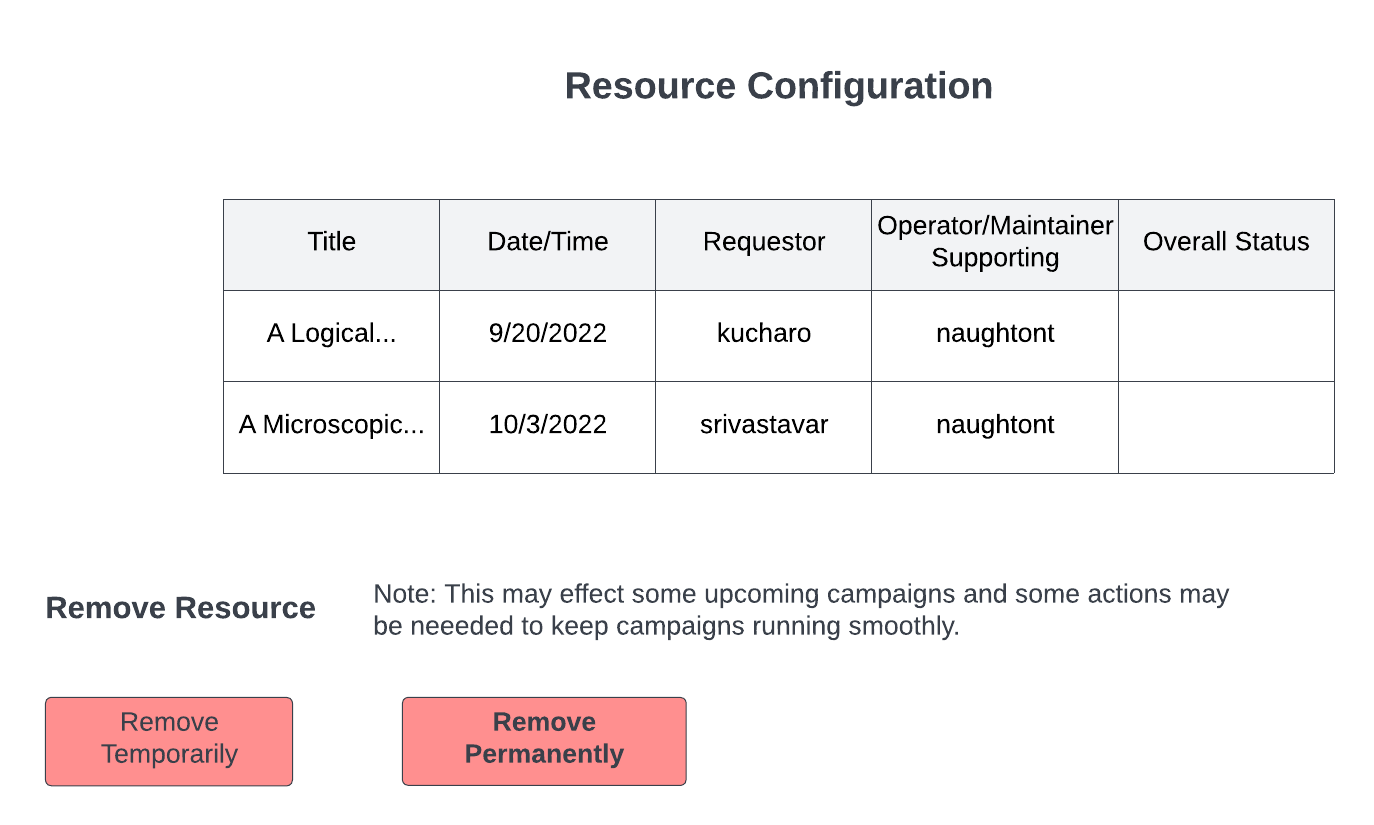
Fig. 94 Options are given to temporarily or permanently remove the resource.