Owner views managed Resource listing
Preconditions
The user is logged into INTERSECT with the owner role assigned and specific resources assigned to them.
Postconditions
The owner is shown a list of resources that they manage with an ability to add resources and view their current status.
Methodologies
This listing could be segregated by the type of the resource (e.g. observational resources, visualization application, data analysis application)
This view could have bare minimal information about the resource in the interest of space
Clicking on an existing resource allows management of said resource (see below)
This listing would also list Resources that are in “draft” mode - something that the team is putting together but has not yet submitted to INTERSECT Administrator(s)
This listing would also list Resources that have been submitted to the INTERSECT Administrator(s) and are currently being reviewed
This listing would also list Resources that have been rejected by the INTERSECT Administrator after reviews. Perhaps this allows the Owner to copy paste content to newer applications, learn from failures, etc.
Button to add new resource (see below)
An example interface is depicted in Fig. 98.
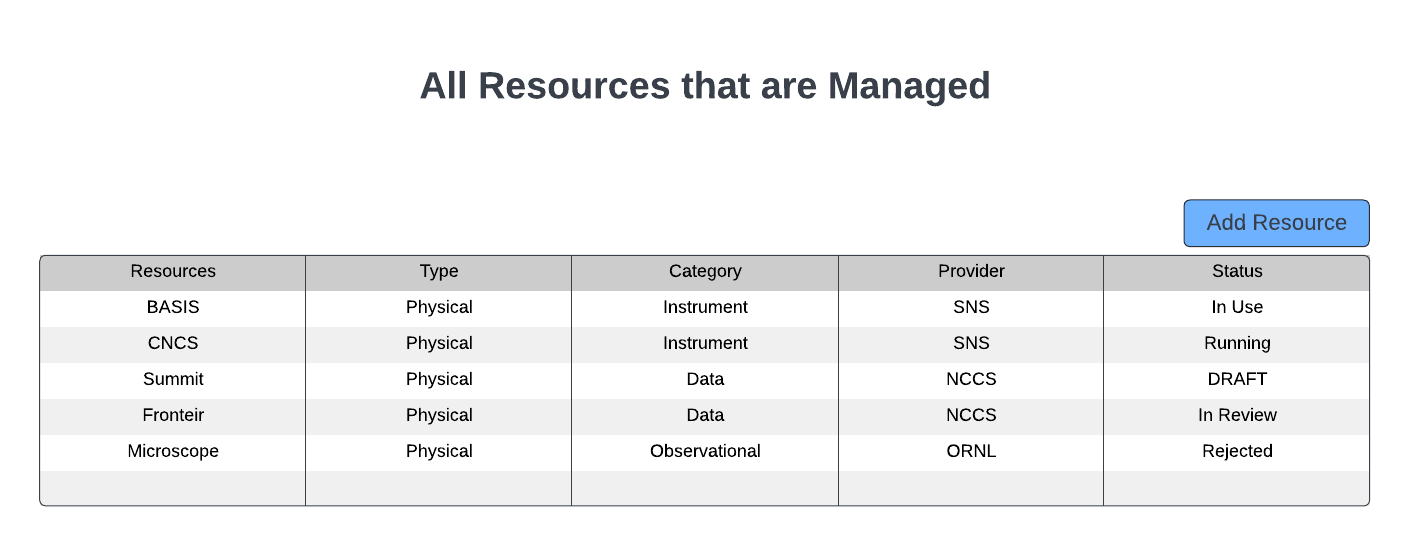
Fig. 98 A list of resources separated by Type, Category, and Provider.