Operator views notifications
Preconditions
The user is logged into INTERSECT with the operator role assigned.
Postconditions
The operator can see a panel with resource behavior, resource usage requests, and resources addition applications for a resource(s) they manage.
Methodologies
Notification Panel would be divided into at least 3 segments:
Other (relevant to all Users)
Resource behavior / performance alerts - whenever Resource is not in good health or active usage
The listing table could have the following columns:
Resource Name
Resource state - identifier,
Date and time of event
Resource usage requests (for upcoming Campaigns) -
The listing table could have the following columns:
Date and time of Campaign
Campaign ID
Resource requested
Resource configuration identifiers if any
Primary User for Campaign
Additional information regarding the request can be obtained from the detailed view of the Campaign
Notification will be dismissed only when the Resource is no longer blocked by this OM or whenever the OM manually dismisses the notification
Resource addition applications - Resources that an Owner would like to add to INTERSECT and has listed this Operator / Moderator as a
This listing could have the following columns:
Resource ID
Resource Name
Resource Classification
Application start date and time
An example interface is depicted in Fig. 103.
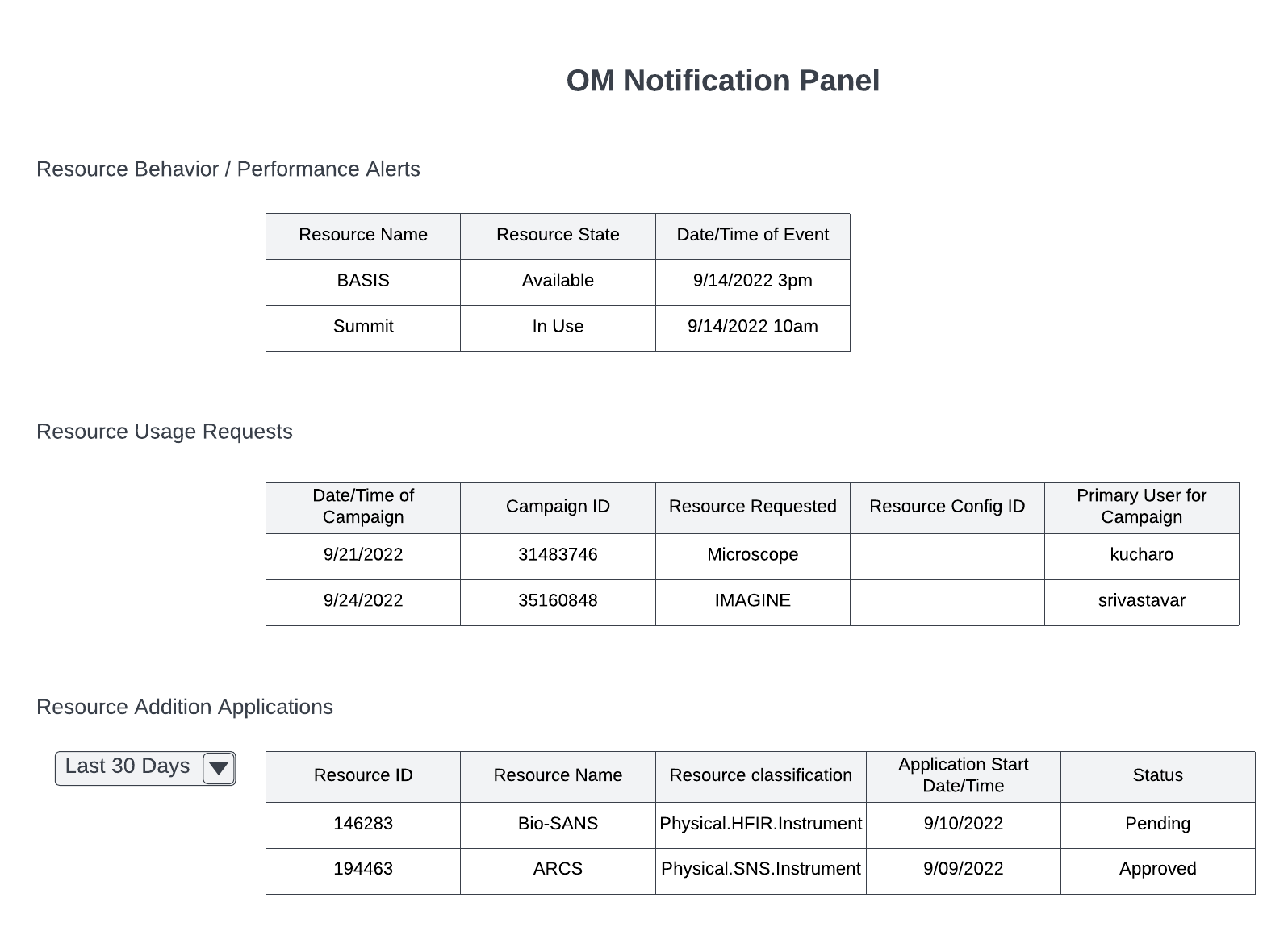
Fig. 103 Operator / Maintainer notification panel.